Mail Migration in Batches
Learn how to efficiently migrate mail in batches with our comprehensive guide.
Migrating Your Business Email: A Batch Approach That's Easier Than Herding Cats
Ah, the joys of running a business - where every decision feels like a high-stakes game of Jenga. One wrong move, and your email system comes tumbling down. If you're pondering a switch in mail providers (maybe Gmail's getting pricey, or you're eyeing that shiny new Outlook setup), fear not. Migrating in batches using clever forwarding rules can make the process as smooth as a well-brewed cuppa. This method lets you transition gradually, keeping internal comms flowing without anyone noticing the swap. We'll keep it high-level here, focusing on the strategy rather than the nitty-gritty tech bits, but I'll sprinkle in enough details to get you started confidently.
First off, why batches? Picture your team as a flock of ducks - you don't want to dunk them all in the new pond at once and cause a splashy chaos. Batch migration means dividing your users into manageable groups: start with a small pilot team (say, your IT folks or a single department), then roll out to others. This minimizes downtime and lets you iron out kinks early. Assess your current setup - inventory all accounts, domains, and any custom rules. Tools like your provider's export features or third-party migration services (think BitTitan or SkyKick) can help pull data over, but the real magic lies in forwarding to bridge the old and new worlds.
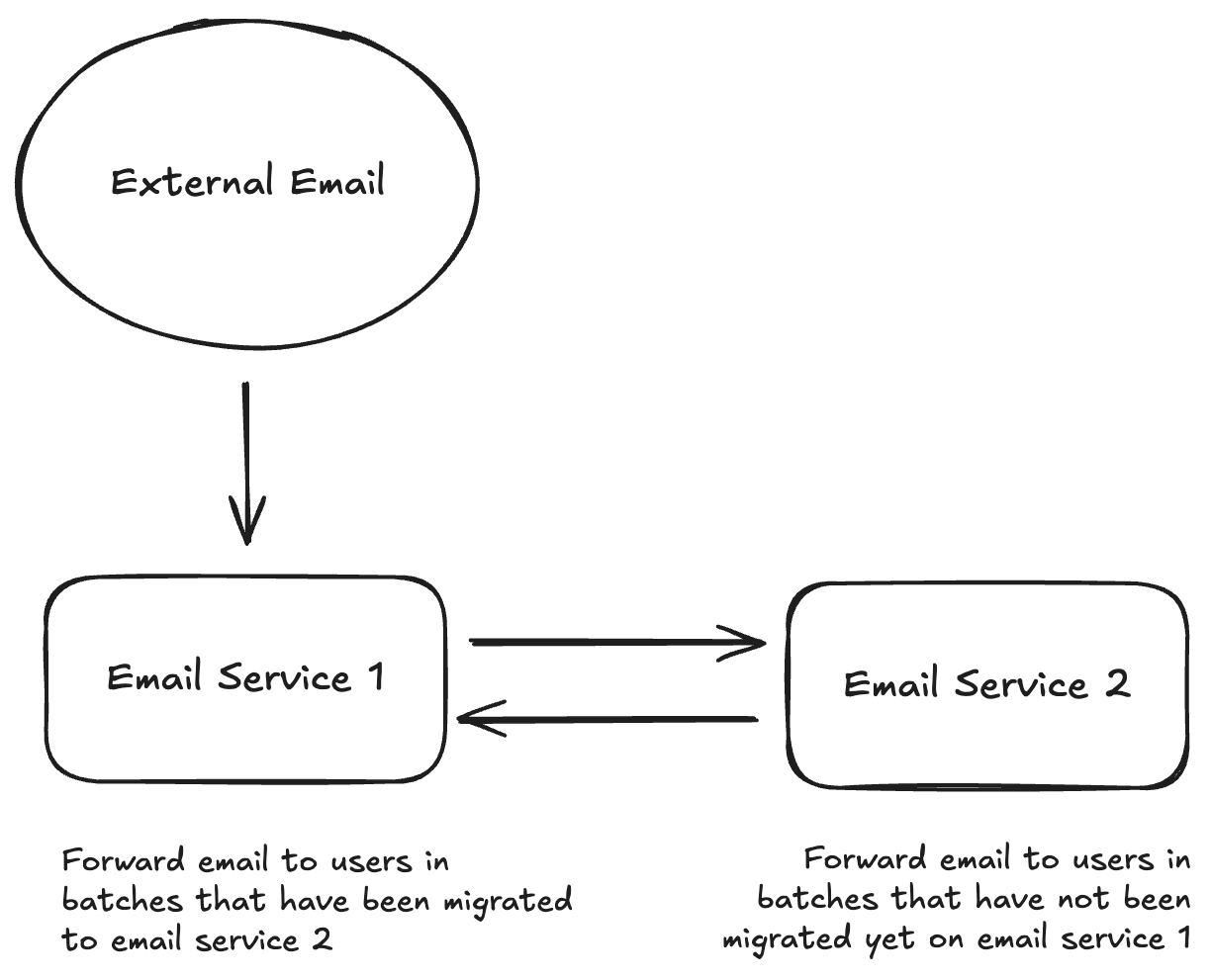
Enter forwarding rules: these unsung heroes ensure emails don't vanish into the ether during the switch. On your old provider, set up rules to forward incoming mail to the new addresses for the batch you're migrating. Crucially, for internal communications, configure selective forwarding - only external emails get rerouted, while internal ones stay put until everyone's on the new system. This retains threaded conversations and prevents reply-all nightmares. For example, in Google Workspace, you can use routing rules to forward based on sender domains; in Microsoft 365, transport rules do the trick. Test this thoroughly in your pilot batch to avoid any "Where did my email go?" panics.
Now, let's outline the batch process step-by-step, keeping it relaxed but precise. Kick off by creating mirrored accounts on the new provider - same usernames, aliases, and all. Export and import historical data for the first batch (IMAP migration is your friend here for seamless transfer). Activate forwarding on the old side for externals, and perhaps set up auto-replies to notify senders of the change if needed. Monitor for a week or two: check spam filters, delivery rates, and user feedback. Once solid, repeat for the next batch. Pro tip: Schedule migrations during off-peak hours, and communicate transparently - a cheeky email like "We're upgrading our email - bear with us!" goes a long way.

Of course, no migration is without its quirks. Watch out for authentication hiccups; ensure MX records are updated only after the full switch to avoid bounces. Data loss is rare but possible, so backups are non-negotiable. And don't forget about integrations - calendars, CRMs, and apps might need reconfiguration. On the upside, this batched forwarding approach retains internal continuity beautifully: emails between colleagues on the old system stay there until migration, and once everyone's over, you can consolidate archives. It's like moving house room by room instead of cramming everything into a van at dawn.
Wrapping up, migrating mail providers doesn't have to be a beard-pulling ordeal. By batching it out and leveraging forwarding rules, you're ensuring business as usual while upgrading under the hood. Give your team the heads-up, test obsessively, and soon you'll be toasting to a seamless transition. If you're the bearded developer type (wink), this method aligns perfectly with iterative development - small changes, big wins. Ready to dive in? Grab that coffee, and let's make your email migration a story worth telling.
Need Something Else?
Let's work together to create a custom solution that meets your needs. Contact us today.